
In the fast-paced world of electric vehicles, where your smartphone doubles as your car key, forgetting it inside your Tesla could turn a quick errand into a major hassle. But Tesla’s latest software wizardry is here to change that. The Tesla 2025 Holiday Update has officially rolled out, introducing the innovative Phone Left Behind Chime feature—a smart alert that chimes and displays a visual reminder if you leave your phone on the wireless charging pad. This addition is part of a suite of holiday-themed enhancements designed to make your Tesla experience even more seamless and stress-free.
If you’ve ever walked away from your Model 3, Model Y, or Cybertruck only to realize your phone (and thus your key) is still charging inside, this update is a holiday gift from Elon Musk and the Tesla team. As Tesla continues to dominate the EV market with cutting-edge software updates, this feature underscores their commitment to user-centric innovation. Read on to dive into how this works, what else is new in the 2025 Holiday Update, and why it’s a must-have for every Tesla owner.
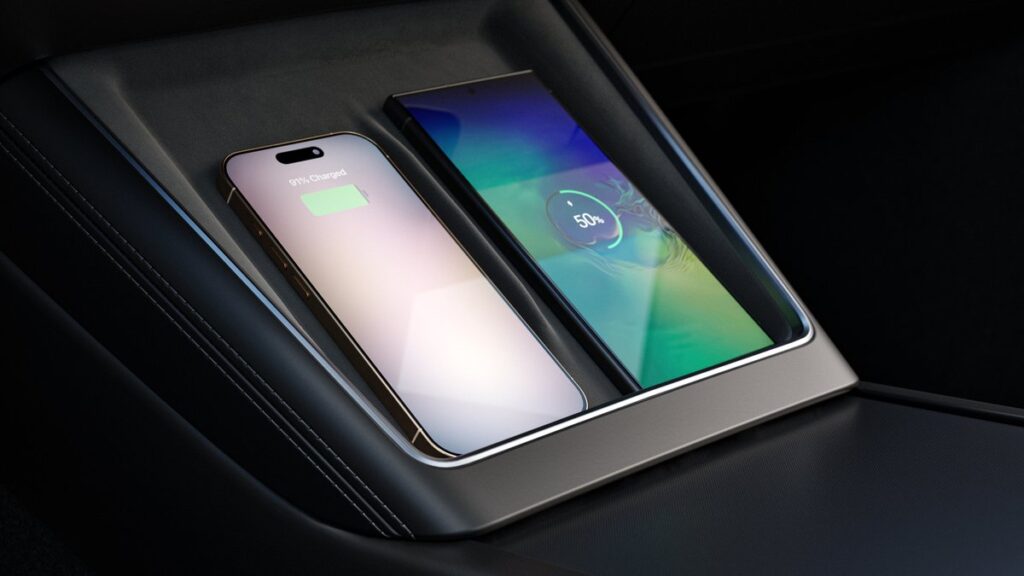
How the ‘Phone Left Behind’ Chime Works: A Demo Straight from Tesla Owners
The buzz around this feature exploded thanks to a viral demo shared by Tesla enthusiast Nic Cruz Patane on X (formerly Twitter). In the short video, Patane simulates a real-world scenario: He places his phone on the center console’s wireless charging pad, exits the vehicle, and closes the door. As he steps away, the Tesla emits a distinctive chime—audible even from a short distance—and the infotainment screen lights up with a playful animation featuring a phone icon accompanied by a question mark, essentially asking, “Hey! You left your phone behind!”
This isn’t just a gimmick; it’s powered by ultra-wideband (UWB) technology for precise phone detection, ensuring the alert triggers only when you’ve actually left the vehicle. The chime plays immediately upon door closure if the priority phone is detected on the charger, preventing lockouts and potential security risks. Patane’s post, which has garnered over 16,000 views in hours, quotes an earlier clip from user @Deandawiz echoing the same sentiment: a humorous “Hey! You left your phone behind!” moment that highlights the everyday frustration this feature solves.
Early reactions from the Tesla community are overwhelmingly positive, with owners praising it as a “lifesaver” for busy parents and forgetful commuters alike. However, some users on X have raised practical concerns: The audible chime could alert potential thieves to an unlocked car with the key inside, and the visible screen graphic might draw unwanted attention in public lots. One commenter noted, “It’s great so that thieves can immediately tell that the car is unlocked and the phone is inside.” Tesla could address this in future tweaks by allowing customizable chime volumes or location-based muting.
For those upgrading to the latest firmware (version 2024.44.25 or later), this feature integrates seamlessly with existing phone-as-key systems, making it especially useful for the refreshed Tesla Model Y Performance 2025 models hitting U.S. roads this December—as we detailed in our recent coverage of Tesla Model Y Performance 2025 Deliveries Begin.
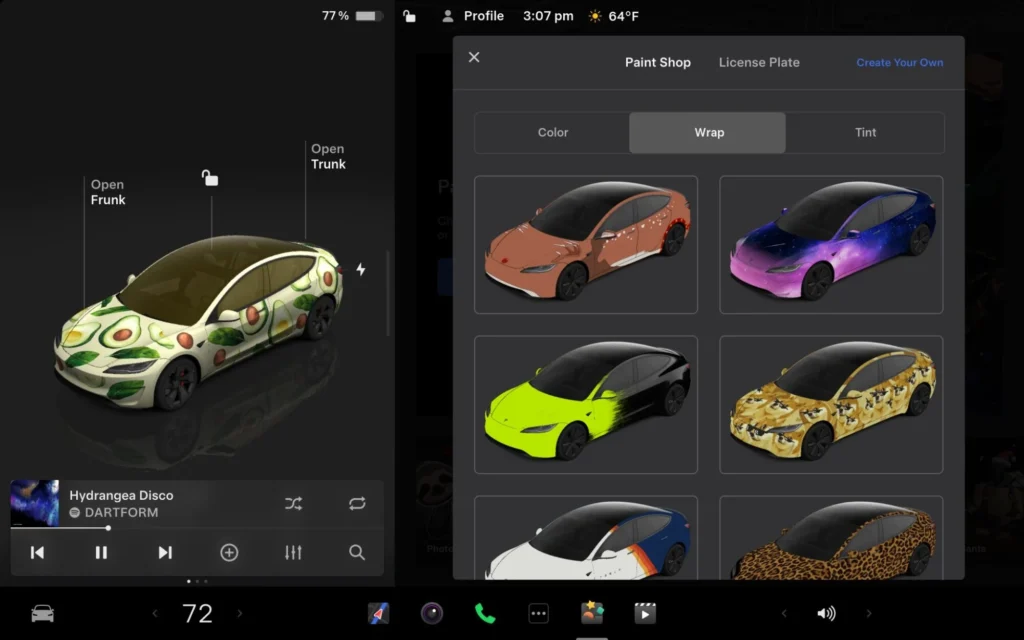
Beyond the Chime: Top Features in Tesla’s 2025 Holiday Update
The Phone Left Behind Chime is just the tip of the iceberg in this festive software release. Tesla’s 2025 Holiday Update packs a punch with features that blend fun, functionality, and future-proofing. Here’s a breakdown of the highlights:
1. Grok Integration with Navigation Commands (Beta)
- Tesla’s AI sidekick, Grok, now handles voice commands for navigation. Say goodbye to typing destinations—simply ask Grok to “find the nearest Supercharger” or “route me to the best holiday light display.” This beta feature leverages xAI’s witty personality for more intuitive interactions, building on the Full Self-Driving (FSD) advancements we explored in What Does 6.5 Billion Miles Mean for Tesla’s Full Self-Driving?.
2. Tesla Photobooth App
- Capture holiday memories with the new in-car Photobooth mode. Using the cabin camera, it applies festive filters like Santa hats or snow effects to group selfies. Perfect for road trips with family—export directly to your phone for instant sharing.
3. Dog Mode Live Activity
- Pet owners, rejoice! Dog Mode now supports live activity updates on your iPhone or Android, showing real-time cabin temperature and alerts if conditions change. It’s a thoughtful evolution of Tesla’s climate control smarts.
4. 3D Supercharger Maps and Wireless Charging Toggles
- Visualize your next charging stop in stunning 3D with interactive site maps. Plus, quick toggles for wireless phone charging make it easier to enable or disable without digging through menus.
Notably absent? Apple CarPlay and Android Auto integration, which continues to be a sore point for some users. Tesla’s proprietary ecosystem remains front and center, prioritizing native apps over third-party compatibility.
These updates are rolling out over-the-air (OTA) to eligible vehicles worldwide, starting with Model 3, Model Y, Model S, Model X, and Cybertruck. If you’re still on an older firmware, head to your Tesla app to check for availability.
Why This Update Matters for Tesla Owners and the EV Future
In an era where EVs like Tesla are redefining mobility, small quality-of-life improvements like the Phone Left Behind Chime can make a big difference. It reduces user error, enhances security, and keeps you connected without interrupting your flow. As autonomous driving edges closer—think the recent Tesla Robotaxi Breakthrough in Nevada—features like this bridge the gap between today’s conveniences and tomorrow’s hands-free world.
Tesla’s software edge continues to set it apart from competitors. While Hyundai grapples with self-driving setbacks (as covered in our piece on Hyundai Self-Driving Chief Quits After Failed Tesla-Like Shift), Tesla’s OTA updates keep owners ahead of the curve without a single trip to the dealership.
Stay Ahead of the Curve with US on Wheels
At US on Wheels, we’re passionate about keeping you informed on the latest in EVs, autonomous tech, and automotive innovation. If you’re eyeing a Tesla upgrade, check out our roundup of Tesla’s Indian Gamble for global expansion insights or gear up for the Tesla Roadster 2026 Unveiling, Elon Musk’s potential swan song to manual driving.
What do you think of the Phone Left Behind Chime? Have you experienced a “forgot my phone” mishap in your Tesla? Drop your thoughts in the comments below, and don’t forget to subscribe for more Tesla Holiday Update 2025 breakdowns and EV news delivered straight to your inbox.
Sources: Tesla official release notes, Electrek, Not a Tesla App, Teslarati, and X user @niccruzpatane.